Your Model Can Now Show Its Work, Word by Word
In July I introduced dakma-sdk as an alpha with a simple promise: your pipeline already knows why it made a decision, so capture it as it runs instead of reconstructing it later. Today dakma-sdk reaches 1.0, the first stable release, and it’s on PyPI.
Two things define this release: the decision event, which is now the SDK’s foundation, and explain_text, which brings token-level explanations to text classification.
The decision event
Every explained inference now produces a single object, the decision event, and everything you’d want to know about that decision hangs off it:
Project → AI Decision Event → AuditEvent
             ├── Provenance   (Model, Dataset)
             ├── Explanation  (method, status, factors, quality)
             └── Governance   (documentation fields, evaluation)
Six core objects make up the model:
- Project: what the work belongs to
- Model and Dataset: the provenance, meaning which model, trained on what
- Decision: the outcome, its score and the threshold it was read against
- Explanation: the method used, its status, and the factors behind the decision
- AuditEvent: the log entry, appended with
type="decision"for each event
DecisionEvent is the runtime aggregate that ties them together and is what you get back from your decorated function.
import dakma

dk = dakma.init(project="credit-scoring")

dk.dataset(id="credit-training", version="2026-08", row_count=1823921)
model = dk.model(
    name="credit-risk",
    version="3.2.1",
    artifact=classifier,   # lets SHAP and the model hash resolve automatically
)

@model.explain()
def predict(x):
    return classifier.predict_proba(x)

result = predict(applicant)
print(result.decision)      # Decision(value="DECLINED", score=0.421, threshold=0.5)
print(result.explanation)   # Explanation(method="shap", status="success", factors=[...])
print(result.audit_id)
A few things happen here without extra work. Registering the model with its artifact means SHAP and the model hash resolve automatically, so “which exact model made this decision?” always has an answer. The decision, the explanation and the audit id arrive together, so there’s no separate step to link a prediction to its reasoning. And because each event is appended to the audit log, the record exists whether or not anyone asks for it later.
If you started on the earlier API, nothing breaks. @dm_c.explain(...) still works, returns a decision event, and keeps the decision_output and explain names you already use:
result = score_applicant(model, applicant_row)
print(result.decision_output.to_text())
print(result.explain.plain_language)
print(result.explain.audit_trail_id)
That’s what stable means here: the decision event and its six core objects are the part you can build on.
explain_text: see which words drove the decision
Tabular explanations tell you which features mattered. For text, the question is which words mattered. explain_text answers it using Integrated Gradients, attributing the decision to individual tokens.
import dakma
import torch

dk = dakma.init(project="review-sentiment")
model = dk.model(name="review-sentiment", version="1.0.0", artifact=classifier)

review = ("the food was delicious and the staff was friendly and attentive "
          "but the bread was stale and the service was cold and the wait felt slow")
tokens = review.split()

@model.explain_text(tokens=tokens)
def classify(ids):
    return torch.softmax(classifier(ids), dim=1)

event = classify(encode(review))

print(event.highlighted_text())        # the review, each word shaded in the terminal
print(event.explanation.plain_language)
for a in event.explanation.text_attributions:
    print(a.token, a.impact)           # delicious 0.3808, stale -0.3577, ...
Here is what the SDK produces for that review, taken straight from the generated report:
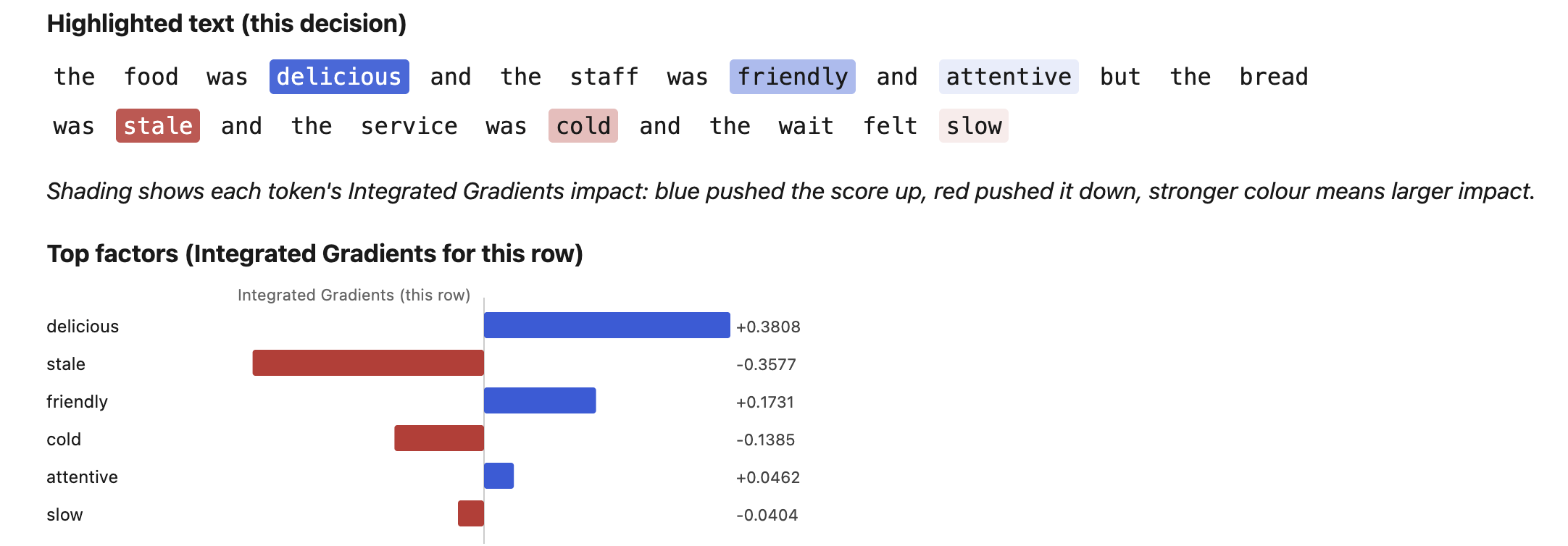 A real
explain_text report. Blue words pushed the score up, red words pushed it down, and a stronger colour means a larger impact.
The review is deliberately mixed, which is where the explanation earns its keep. The model weighs praise and complaints against each other, and you can see exactly how: “delicious” and “stale” are almost equal and opposite (+0.3808 and -0.3577), so they largely cancel, and the smaller words around them decide the outcome. A bare sentiment score would tell you none of that. Notice too that the filler words, “the”, “was” and “and”, carry no shading at all, so the explanation points at what matters.
It works on the model you already have
Attributions are taken over word embeddings through a forward hook, so any model containing an nn.Embedding works, including Hugging Face encoders. Nothing needs to be restructured to fit the SDK. If a model embeds several inputs, pass embedding_layer= to say which one to explain.
Readable token labels
Display tokens come from either tokens= (a list, or a callable that receives the id tensor) or tokenizer= (anything exposing convert_ids_to_tokens). Without either, you get positional token_0, token_1 labels, which still work but are harder to read.
What the numbers mean
Impacts explain the score the threshold read, which is the last model output. A positive impact pushed the text towards APPROVED, and a negative one pushed it away. In the report, that’s blue and red. If you want to attribute a different class, pass target_class=.
Three ways to read it
Each decision event carries per-token impacts on explanation.text_attributions and renders them as:
highlighted_text()for terminals and notebooks, with each word shaded by its impacthighlighted_text("markdown")for documentshighlighted_text("html")for reports
Reports written with write_report(...) include a Highlighted text section automatically, next to the ranked per-token impact bars you see above. A reviewer sees the original text with the influential words marked, instead of decoding a table of numbers. The repo includes examples/text_highlight_example.py, which writes a token-highlighted HTML decision you can open in a browser.
When attribution can’t run
If there’s no embedding layer, or no id tensor, inference does not fail and does not quietly return an empty explanation. You still get your decision event, but explanation.status is "degraded" and the reason is recorded in explanation.metadata["attribution_error"]. A missing explanation should never look like a clean one.
For tabular tensors, explain_integrated_gradients remains the tool. Its reduce_attributions_to_features helper now also accepts reduce="tokens", in case you need per-token impacts from an attribution matrix you computed yourself.
A note on scope
dakma-sdk is a documentation aid. It records and explains decisions, but it doesn’t provide legal advice or regulatory certification. Decision labels also default to APPROVED / DECLINED, a credit-style framing that won’t suit every task, which is worth remembering for something like sentiment classification.
Try it
pip install dakma-sdk                    # core
pip install "dakma-sdk[ml]"              # + pandas, scikit-learn, XGBoost, SHAP
pip install "dakma-sdk[ml,dl]"           # + PyTorch, Captum
explain_text needs the dl extra. Import as dakma or dakma_sdk. If you try it on a text model with an unusual embedding setup, I’d like to hear what breaks. Issues and ideas are welcome on GitHub.
Dakma: making AI decisions explainable and auditable.